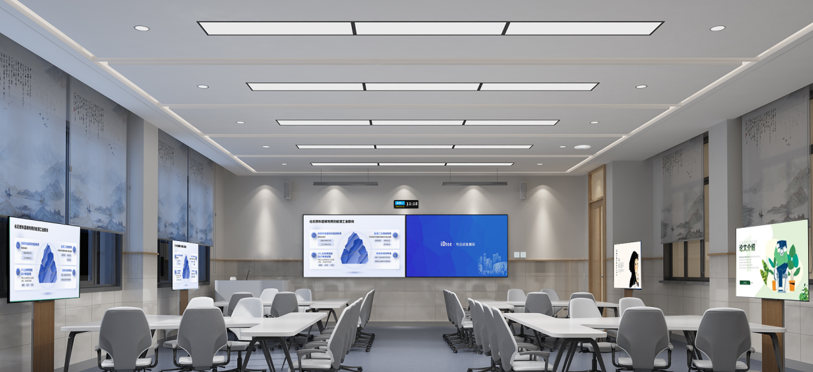
Classroom Audio Visual Systems – Improve the Way You Teach by transforming how educators deliver lessons. These systems make teaching more engaging and interactive, allowing teachers to use clear sound and vibrant visuals that enhance student learning. The global market for Classroom Audio Visual Systems – Improve the Way You Teach was valued at $2.5 billion in 2024 and is expected to more than double, reaching $5.8 billion by 2033.
Aspect
Details
Market Size (2024)
USD 2.5 billion
Projected (2033)
USD 5.8 billion
Highest Growth
Asia Pacific (CAGR over 10%)
Schools increasingly recognize the value of Classroom Audio Visual Systems – Improve the Way You Teach, as administrators observe significant benefits for both teachers and students. These systems have become essential tools in modern education, improving the way you teach and learn.
Key Takeaways
Classroom audio visual systems use things like interactive displays and microphones. These tools make lessons more exciting and help students learn more.
These systems help different learning styles by using pictures, sounds, and touch. This lets all students take part and understand lessons better.
Teachers can talk clearly and reach every student without yelling. This helps students listen and act better in class.
Interactive lessons use videos, games, and group work to keep students interested. These activities help students remember what they learn.
Schools need to plan well, train teachers, and take care of AV equipment often. This helps schools get the best results from these systems.
User-friendly interfaces (touchscreen, remote, app) to manage all AV equipment seamlessly.
Connectivity Devices
Devices providing reliable wired and wireless connections to integrate laptops, tablets, and other tools.
When designing a classroom AV system, people think about room size and hybrid learning. They also plan for the future. Projectors and screens show big, clear pictures. Audio systems make sure everyone hears well. Interactive displays help students work together. AV solutions help students in the classroom and those learning from home. This makes smart classrooms open to everyone.
Integration with Teaching Tools
Classroom AV systems work well with other teaching tools. Teachers can connect interactive displays to digital whiteboards. This lets them write and work together in real time. AV control systems make it easy to switch between devices or modes. Wireless presentation systems let students share their screens. This helps everyone join in and work as a team.
Good classroom AV design means picking the right equipment for each class. Devices should be placed where everyone can see and hear. Internet connections must be strong and steady. Schools often link AV equipment with learning management systems. This makes it simple to share videos and track how students are doing. Cameras and microphones are put in smart places for hybrid learning. Security features keep online classrooms safe.
A smart classroom uses AV tools to help teachers and students. Teachers use AV systems to add videos and games to lessons. They can teach students in the classroom and online at the same time. Classroom AV design keeps changing to help more students and make learning better.
How AV Systems Improve the Way You Teach
Enhancing Engagement
Classroom audio visual systems change lessons into fun learning spaces. Teachers use tools like interactive displays and projectors to make lessons exciting. These AV systems let students join in with touchscreens, quizzes, and group work.
Seeing and hearing information at the same time helps students remember more and pay attention.
Teachers who talk in a friendly way and sound excited help students pay attention.
Breaking videos into parts and adding questions helps students stay focused and learn better.
Taking out extra details makes lessons easier to understand.
Using the right kind of media, like animations with talking, helps students stay interested.
Making videos for each class makes lessons more interesting and important.
Interactive tools like Kahoot! and Quizlet make learning fun and help students join in more. These games and quizzes can make students pay attention almost 50% more. Teachers also use lecture capture and streaming so students can watch lessons again when they want. AI-powered AV tools, like cameras that follow the speaker, help keep students focused and make lessons more exciting. In a smart classroom, these tools help students learn better and teachers teach better.
Tip: Teachers can use short, fun videos and games to help students stay focused and excited during lessons.
Supporting Diverse Learners
Classroom AV systems help all kinds of students learn in different ways. Teachers use AV equipment to help students who learn best by seeing, hearing, or doing things. These systems also help students with disabilities, language problems, or special needs by giving them easy-to-use lessons.
Learning Style
Audio-Visual System Examples
How It Facilitates Differentiated Instruction
Auditory
Audio recordings, spoken explanations, recorded lessons
Helps students learn by listening and remembering.
Lets students learn by touching and moving things.
Studies show that classroom audio visual systems help students with disabilities do better in school and talk with others. Interactive video lessons and video modeling help students learn social skills and be more independent. Video learning platforms like Edpuzzle help students remember lessons and make classrooms more welcoming. Teachers can use these tools with learning management systems to check how students are doing and give them lessons that fit their needs.
Aspect of Support
Description
Examples / Findings
Target Groups
Students with disabilities, language barriers
Better social skills, talking, and schoolwork
Types of AV Systems
Interactive video, video modeling, live and recorded video
Work well in all types of classrooms
Technology Benefits
Easy to use again, helps students understand feelings
Makes learning more fun and helps students remember more
Classroom AV systems also help students who like using digital tools. These students can share their ideas and join in more with classmates and teachers. This makes everyone feel like they belong and helps all students take part in class.
Clear Communication for Teachers
Teachers get a lot of help from classroom audio visual systems. Microphones and speakers make sure every student hears the teacher, even in the back. Without these tools, students in the back can miss almost half of what the teacher says. With AV systems, teachers do not have to shout, so their voices do not get tired.
Audiovisual systems help teachers by making their voices louder and clearer.
Using sound systems means teachers get tired less and miss fewer days of work.
When students hear the teacher clearly, they pay attention and behave better.
Good listening helps teachers manage the class more easily.
These systems help shy students join in and make the class friendlier.
Classroom AV control systems let teachers switch between lessons, videos, and activities easily. Audience response systems, like clickers, let students answer questions without saying their names, so they feel comfortable joining in. Teachers can also record lessons for students to watch later, which helps everyone keep up.
A smart classroom with AV equipment helps both teachers and students. Teachers feel less tired, talk better, and run the class more smoothly. This means students join in more, pay better attention, and learn more in every lesson.
Classroom AV systems turn lessons into fun, hands-on learning. Teachers use these tools to make activities that get students involved. For example, an audio-visual crossword game uses sounds and pictures to help students remember words. Visual assessments show stories with pictures and sound, then ask questions using both. In goal-driven immersive learning, students pick what to do and get feedback. Museum simulations let students walk through 3D spaces with pictures and videos. These activities help students work together and join in.
Example Name
Description
Audio-Visual Elements Used
Impact on Student Participation
Audio-Visual Crossword
Students remember words with sound or picture hints.
Audio clues, images
Helps students use what they know in a fun way.
Visual Assessment
Stories with pictures and sound, plus open-book tests.
Visual screens, audio-visual Qs
Gets students involved with different types of media.
Goal-Driven Immersive Learning
Students make choices and get feedback in real situations.
Hotspots, instructive feedback
Lets students practice making decisions and learn from them.
Museum Simulation
3D tours with pictures and videos to explore.
Images, videos
Makes students want to explore and learn by seeing new things.
Interactive displays let students touch, draw, and make things on the screen. Teachers can write notes right away, give quick feedback, and help students work as a team. Wireless screen sharing lets everyone take part, so learning is more lively.
Better Retention
Audiovisual technology helps students remember what they learn for longer. Studies show that using virtual reality and multimedia helps students keep information, especially in science and math. Students who use VR remember how things work better than those who only read books. Strong pictures and sounds help students remember lessons even after a week.
Quick feedback and writing on lessons help students see how they are doing.
These tools make learning more active and help students remember lessons better.
Inclusive Classroom Learning
Classroom AV systems help make sure every student can learn. Teachers use these tools to help students with different needs. For example, text-to-speech software reads words out loud for students who have trouble reading. Speech recognition helps students who find writing hard by letting them talk instead. Special listening devices make sounds clearer for students who cannot hear well. Graphic organizers and mind maps help students see their ideas.
Assistive Technology Type
Role in Inclusive Education
Text-to-Speech Software
Reads words out loud for students who cannot see or read well.
Speech Recognition Software
Lets students talk instead of write if writing is hard.
Assistive Listening Devices
Makes sounds easier to hear for students with hearing problems.
Graphic Organizers and Mind Mapping
Helps students see and sort their ideas if they have trouble planning.
AAC Devices
Helps students talk if they have trouble speaking.
Electronic Braille Displays
Changes digital words into Braille for students who cannot see.
Adaptive Keyboards and Mouse Devices
Changes keyboards or mice for students who have trouble moving.
Universal Design for Learning means every student can get lessons in different ways, like text, sound, or video. Teachers also use captions, written scripts, and sign language to help students who cannot hear or see well. These AV tools help students work together and join in, even if they are learning from home. This makes learning open and fun for everyone.
Implementing Classroom Audio Visual Systems
Planning and Setup
Schools need to follow clear steps to set up classroom audio visual systems. First, they look at what each classroom needs and wants to achieve. Every classroom is different, so classroom av design should fit the lesson goals. Next, schools make a budget that works for both money and learning. They pick classroom audio visual equipment that matches the room’s size, light, and shape. Classroom av design also thinks about how many students are there, what lessons are taught, and if hybrid learning is needed. The technology picked should be easy to change or add to later. Experts should install classroom av systems so everything works well. Teachers get a setup that helps them teach in class or online.
Teachers need to practice using classroom av systems to feel sure of themselves. Good training helps teachers learn new skills, not just how to use the tools. Teachers can try out classroom av control system tools with help from others. If teachers have problems, they can get help quickly. Training rooms with AV technology let teachers learn together and share ideas. When teachers know classroom av design well, they can focus on teaching instead of fixing things. Training should show easy ways to use things like USB soundbars or simple camera buttons.
Working together helps teachers make better classroom av design.
Maintenance Tips
Checking classroom audio visual systems often keeps them working well. Schools should look at microphones, speakers, projectors, and cables a lot. Cleaning and putting things away right stops dust and damage. Updating software and firmware makes the system work better. Teaching staff how to fix small problems means less waiting for repairs. Using the same classroom av system in every room makes fixing things easier. Schools should write down when they check things and have a team to do regular checks.
Note: Working with expert service providers means you get good checks and fast repairs when needed.
Classroom audio visual systems help teachers make lessons more fun and interesting. These tools let students and teachers use things like interactive displays and classroom AV control systems. Audio visual equipment for schools helps everyone learn better. Some big benefits are:
Getting experts to set up a classroom AV system that fits their needs.
Trying out new technology like AR and VR for learning.
Classroom AV systems help all students learn together in a lively and welcoming classroom.
FAQ
What are audio visual classroom systems?
Classroom audio visual systems use projectors, speakers, microphones, and interactive displays. These tools help teachers show videos and presentations. They make lessons more fun and interesting. Schools use these systems to help teachers teach better. They also help students learn more.
How do classroom AV solutions support different learning styles?
Classroom AV solutions have visual, audio, and interactive parts. Visual learners like pictures and videos. Auditory learners listen to clear sound. Kinesthetic learners use touchscreens to join in. This mix helps every student in the classroom.
Why is a classroom AV control system important?
A classroom AV control system lets teachers run all the equipment from one spot. Teachers can change devices, adjust sound, and show things easily. This saves time and keeps lessons going without problems.
What maintenance does classroom audio visual equipment need?
Schools should check classroom audio visual equipment often. Cleaning screens and updating software keeps things working well. Testing microphones and checking cables helps stop problems. Taking care of the equipment makes it last longer.
Can classroom AV systems help students with disabilities?
Yes. Classroom AV systems have audio solutions, captions, and special devices. These features help students with hearing, vision, or learning problems. Audio visual equipment for schools makes lessons open to everyone.
Click the button to contact us for more information