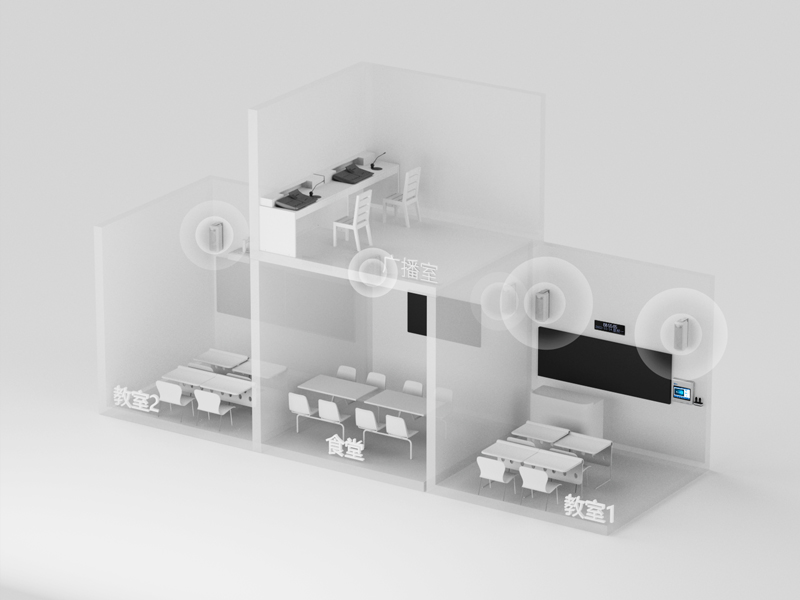
Imagine being able to attend a lecture or campus event from anywhere. The Campus Digital Broadcasting System makes this possible with live streaming. Whether it’s a guest speaker or a sports event, you can tune in without missing a moment. This feature ensures everyone stays connected, no matter where they are.
Real-time announcements and notifications
Need to share urgent updates? This system delivers real-time announcements across the campus. From weather alerts to last-minute schedule changes, you’ll always stay informed. It’s like having a campus-wide megaphone, but smarter and more efficient.
Multimedia integration for diverse content delivery
Why stick to just audio when you can mix it up? The system supports multimedia content, including videos, music, and even interactive elements. This versatility makes it perfect for everything from educational broadcasts to creating a lively atmosphere during breaks.
Scheduled and zone-specific broadcasting
With scheduled broadcasting, you can automate tasks like playing the school bell or morning announcements. Zone-specific broadcasting takes it a step further by targeting specific areas, such as classrooms or outdoor spaces. This ensures the right message reaches the right audience.
Essential Components
Hardware
The system relies on robust hardware like digital audio broadcasting stations, microphones, and high-fidelity speakers. These components ensure clear and stable sound quality, making every announcement easy to hear.
Software
The software is the brain behind the operation. It includes broadcasting platforms and content management systems that let you schedule, manage, and customize broadcasts effortlessly.
Network infrastructure
A strong network is crucial. The system uses IP networks, servers, and Wi-Fi to ensure seamless communication. This digital setup eliminates the need for extra wiring, saving both time and money.
With these features and components, the Campus Digital Broadcasting System transforms how campuses communicate, making it a must-have for modern educational institutions.
Benefits of a Campus Digital Broadcasting System
Enhanced Communication
Streamlined dissemination of information
Keeping everyone informed on campus can be a challenge, but the Campus Digital Broadcasting System makes it simple. It allows you to broadcast school updates, weather forecasts, and even daily schedules with ease. Whether it’s ringing bells automatically or playing inter-class music to create a calm environment, this system ensures information flows smoothly.
Broadcasting school-related information, weather forecasts, and news.
Timing broadcasting
Automatic ringing for daily schedules and broadcasting of gymnastics.
Inter-class music
Playing background music to reduce noise and create a pleasant environment.
Emergency broadcasting
Quick dissemination of emergency information to evacuate crowds.
Improved reach to students, staff, and visitors
You’ll love how this system ensures everyone gets the message. Real-time updates keep students, staff, and visitors informed instantly. Plus, you can tailor messages to specific areas, making them more relevant. During emergencies, alerts reach the right people quickly, reducing confusion and improving response times.
Improved Learning Experiences
Access to recorded lectures and events
Imagine being able to revisit a lecture or campus event anytime. This system makes that possible. Recorded lectures enhance understanding, let you control the pace of learning, and help you manage your schedule better.
The Campus Digital Broadcasting System supports hybrid and remote learning by providing access to live streams and recordings. This flexibility ensures you can learn from anywhere, making education more accessible and inclusive.
Emergency Management
Quick and effective communication during crises
Emergencies demand fast action. This system ensures timely communication, helping you evacuate crowds or direct help where it’s needed. Digital signage and IP network broadcasting make sure everyone gets the message, no matter where they are on campus.
Increased campus safety and preparedness
Safety is a top priority. The system reduces confusion during emergencies by delivering clear instructions. Integration with alerting protocols ensures real-time updates, keeping everyone prepared and informed.
Cost and Time Efficiency
Utilization of existing network infrastructure
One of the best things about the Campus Digital Broadcasting System is how it uses what you already have. Instead of installing new wiring or setting up a separate network, this system works seamlessly with your campus's existing IP network. That means you don’t need to worry about tearing up walls or running cables across buildings.
This smart design not only saves you money but also reduces the hassle of managing multiple systems. Everything runs on a single, unified network. Whether it’s broadcasting announcements, streaming lectures, or playing background music, the system uses the same infrastructure. It’s like upgrading your campus communication without starting from scratch.
Tip: If your campus already has a strong Wi-Fi network, you’re halfway there! This system integrates effortlessly, making the setup process even smoother.
Reduced installation costs and time
Installing a new system can feel overwhelming, but not with this one. The Campus Digital Broadcasting System is designed to minimize both costs and time. By leveraging your current network, you avoid the expense of additional hardware and wiring. This approach significantly cuts down on installation costs.
The setup process is quick and efficient. With fewer components to install, you’ll have the system up and running in no time. Plus, the user-friendly interface ensures that staff can start using it right away without extensive training.
Here’s how it saves you time and money:
No extra wiring: The system uses your existing network, eliminating the need for new cables.
Fewer components: With fewer devices to install, the process is faster and simpler.
Quick setup: The streamlined design ensures minimal downtime during installation.
By choosing this system, you’re not just saving money—you’re also saving valuable time that can be better spent on improving the campus experience.
Steps to Implement a Campus Digital Broadcasting System
Planning and Assessment
Identifying campus needs and goals
Before diving into the setup, you need to figure out what your campus truly needs. Start by asking yourself: What are the main goals of implementing the Campus Digital Broadcasting System? Do you want to improve communication, enhance learning, or boost safety? Think about the specific features your campus might require, like emergency broadcasting, inter-class music, or automated bell ringing. Also, consider the layout of your school. A tailored design ensures the system fits your campus perfectly.
List the functional needs, such as announcements, music, and emergency alerts.
Design a system that matches your campus layout and goals.
Budgeting and resource allocation
Once you know your needs, it’s time to plan your budget. Financial resources play a big role here. You’ll need to allocate funds for hardware, software, and installation. Don’t forget about human resources. Staff and volunteers are essential for running the system. Training is another key factor. Make sure your team knows how to operate the system effectively.
Human resources to manage and maintain the system.
Training resources to ensure smooth operation.
Choosing the Right Technology
Evaluating hardware and software options
Choosing the right tools is crucial. Look for hardware that delivers clear sound and software that’s easy to use. The system should support features like automatic playback, emergency alerts, and background music. A distributed architecture is also a plus, as it allows for easy expansion.
Here’s a checklist to guide you:
High-quality sound through digital communication.
Intelligent design for automatic and scheduled playback.
Expandable architecture for future needs.
Ensuring compatibility with existing infrastructure
Your campus likely has an existing network. Make sure the new system works seamlessly with it. This saves time and money while avoiding unnecessary complications. A system that integrates with your current setup ensures a smoother installation process.
Installation and Setup
Setting up hardware and software
Now comes the exciting part—installation! Start by setting up the hardware, like speakers and microphones, in key areas. Then, install the software to manage broadcasts. Make sure everything is connected to your campus network.
Here’s a tip: Begin with high-traffic areas like classrooms and auditoriums. This ensures maximum impact right from the start.
Testing the system for functionality
Before going live, test the system thoroughly. Check the sound quality and ensure all features work as expected. Evaluate parameters like signal strength and noise levels. Field tests can help you identify and fix any issues. This step ensures your system runs smoothly from day one.
Pro Tip: Regular testing keeps the system reliable and ready for emergencies.
Training and Support
Training staff and students on system usage
Getting everyone comfortable with the Campus Digital Broadcasting System is key to its success. You’ll want to start by organizing hands-on training sessions for staff and students. These sessions should cover the basics, like how to operate the system, schedule broadcasts, and manage emergency alerts. Keep the training simple and interactive. People learn faster when they can try things out themselves.
For staff, focus on advanced features like setting up zone-specific broadcasts or managing multimedia content. Students, on the other hand, might only need to know how to access live streams or recorded lectures. Tailoring the training to each group ensures everyone gets the most out of it.
You can also create quick reference guides or video tutorials. These resources come in handy when someone needs a refresher. Plus, they save time by reducing the need for repeated training sessions.
Tip: Use real-life scenarios during training. For example, simulate an emergency broadcast or schedule a mock announcement. This makes the learning process more engaging and practical.
Establishing ongoing technical support
Even with the best training, questions and issues will pop up. That’s why having reliable technical support is essential. Start by designating a team or individual to handle system-related queries. This team should be well-versed in troubleshooting common problems and maintaining the system.
Regular system checks are a must. They help you catch potential issues before they become major problems. Encourage staff and students to report any glitches they notice. A simple feedback system can make this process smoother.
For long-term success, consider partnering with the system provider for professional support. Many providers offer maintenance packages or remote assistance. This ensures your Campus Digital Broadcasting System stays in top shape, no matter what.
Pro Tip: Keep a log of all technical issues and their solutions. Over time, this becomes a valuable resource for troubleshooting.
Challenges and Solutions in Implementing a Campus Digital Broadcasting System
Cost and Budget Constraints
Exploring affordable options and grants
Budgeting for a new system can feel overwhelming, but there are ways to make it more manageable. Start by exploring affordable options that fit your campus's needs. Many systems, like the Campus Digital Broadcasting System, utilize existing network infrastructure, which reduces installation costs. You can also look into grants or funding opportunities specifically designed for educational technology. These resources can help offset the initial investment, making the system more accessible for schools of all sizes.
Tip: Check with local education boards or technology providers for grant programs that support digital transformation in schools.
Prioritizing essential features
When working with a tight budget, focus on the features that will have the most impact. For example, prioritize emergency broadcasting, automated bell ringing, and real-time announcements. These core functionalities ensure the system delivers immediate value. Once the essentials are in place, you can always expand the system later as more resources become available.
Technical Issues
Ensuring reliable network infrastructure
A strong network is the backbone of any broadcasting system. To ensure reliability, you’ll need to optimize your campus's existing infrastructure. Here are some strategies:
Use a full-network, automated broadcasting system to cover all areas, including classrooms and playgrounds.
Adapt the system’s design to match your campus layout for better coverage.
Support automated operations for daily activities like bell ringing and music broadcasting.
Regularly test the network to identify and fix weak spots.
These steps will help you create a stable foundation for seamless communication across the campus.
Regular maintenance and updates
Even the best systems need upkeep. Schedule regular maintenance to keep everything running smoothly. This includes updating software, checking hardware for wear and tear, and monitoring network performance. Proactive maintenance prevents small issues from turning into major problems. It also ensures the system remains reliable during emergencies.
Resistance to Adoption
Educating stakeholders on the system's benefits
Getting everyone on board can be a challenge, but education is key. Highlight how the system improves communication, enhances safety, and simplifies daily operations. For example:
It provides timely emergency alerts, ensuring quick evacuations and better safety.
It automates daily tasks like bell ringing, saving time and effort.
When stakeholders see the practical benefits, they’re more likely to support the system.
Providing user-friendly interfaces and training
A complicated system can discourage adoption, so simplicity is crucial. Choose a system with an intuitive interface that’s easy for staff and students to use. Offer hands-on training sessions to build confidence and familiarity. Create quick reference guides or video tutorials for ongoing support. When people feel comfortable using the system, they’ll embrace it more readily.
Pro Tip: Use real-life scenarios during training, like scheduling a mock announcement or simulating an emergency broadcast. This makes learning more engaging and practical.
The Campus Digital Broadcasting System is more than just a tool—it's a game-changer for modern campuses. It simplifies communication, enhances learning, and boosts safety. Imagine a system that keeps everyone informed during emergencies, reducing confusion and ensuring faster responses. With over 82% of students concerned about safety, this system addresses those fears effectively. Plus, it supports hybrid learning and makes daily operations smoother.
Adopting this system means you're investing in a smarter, safer, and more connected campus. Why wait? Take the step toward transforming your institution today.
FAQ
What is a Campus Digital Broadcasting System?
It’s a smart communication tool for schools. You can use it to share announcements, stream events, and even manage emergencies. It works through your campus’s existing network, making it efficient and cost-effective.
How does it improve campus safety?
The system sends emergency alerts instantly. Whether it’s a fire drill or a real crisis, everyone gets clear instructions. This quick communication keeps you and others safe by reducing confusion during emergencies.
Can it support hybrid learning?
Absolutely! You can stream live lectures or share recorded ones. This makes it easier for students to learn from home or catch up on missed classes. It’s a great way to make education more flexible and inclusive.
Is it easy to use?
Yes, it’s designed with simplicity in mind. The user-friendly interface lets you schedule broadcasts, manage content, and send alerts without hassle. Plus, training sessions ensure you feel confident using it.
Does it require new wiring?
Nope! The system uses your campus’s existing IP network. This saves time and money while making installation a breeze. You won’t need to worry about tearing up walls or laying down new cables.
Tip: If your campus has strong Wi-Fi, you’re already set for a smooth setup!
Click the button to contact us for more information